 Anchor
Features
Everything Anchor does
Built around one question, "when is my next dose?", with the rest of the day arranged around the answer.
Medication
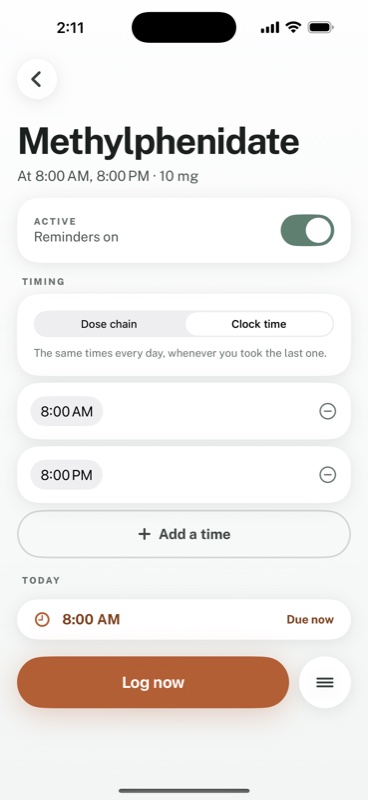
Four kinds of medication, because they don't all behave the same way.
- Dose chain
- Each dose is timed from the one you actually took. Log one late and the rest of the day moves with it. The day's chain begins with your first dose, whenever that is.
- Clock time
- Set times every day, whatever happened with the last dose. A time you missed stays on Today as overdue until you log it.
- Rides along
- A medication that is only ever taken with another one. It joins every dose of its partner, or every second, third or fourth.
- Courses
- A fixed number of days, then it stops. A course can have phases, and the amount can change from day to day for a taper.
- Logging
- One tap for "took it just now", or say when you took it earlier. An undo appears straight after, in case of a mis-tap.
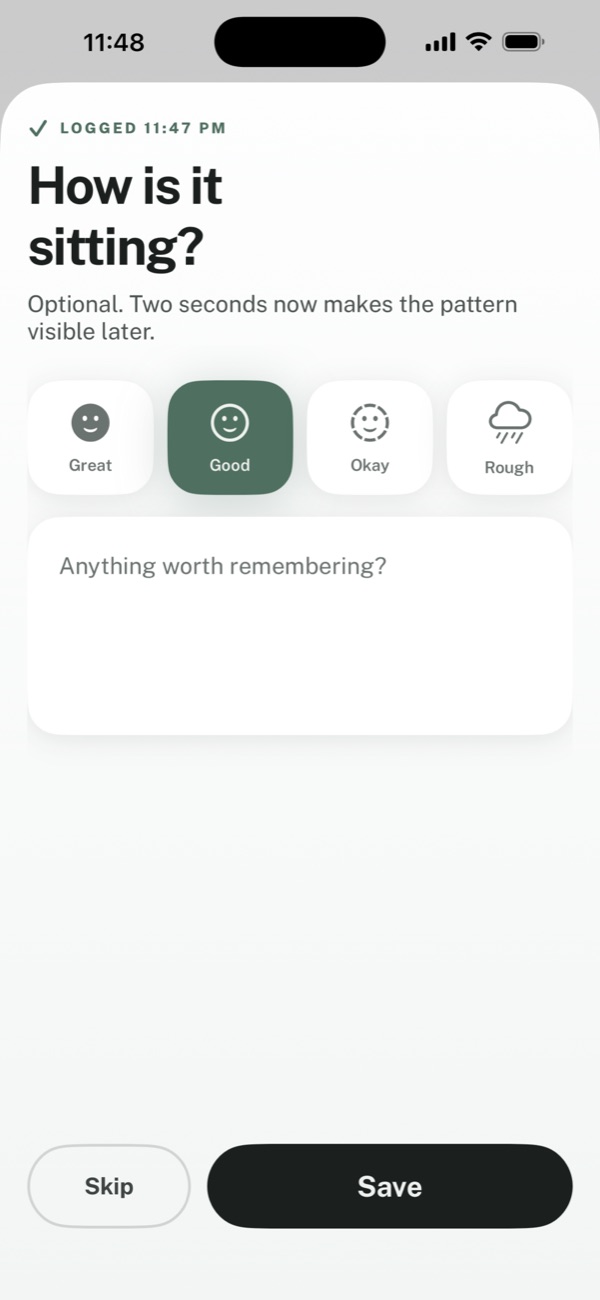
- How it's sitting
- After a dose, an optional four-way check-in (Great, Good, Okay, Rough) and a note.
- Groups
- Organise a long medication list into groups.
Today
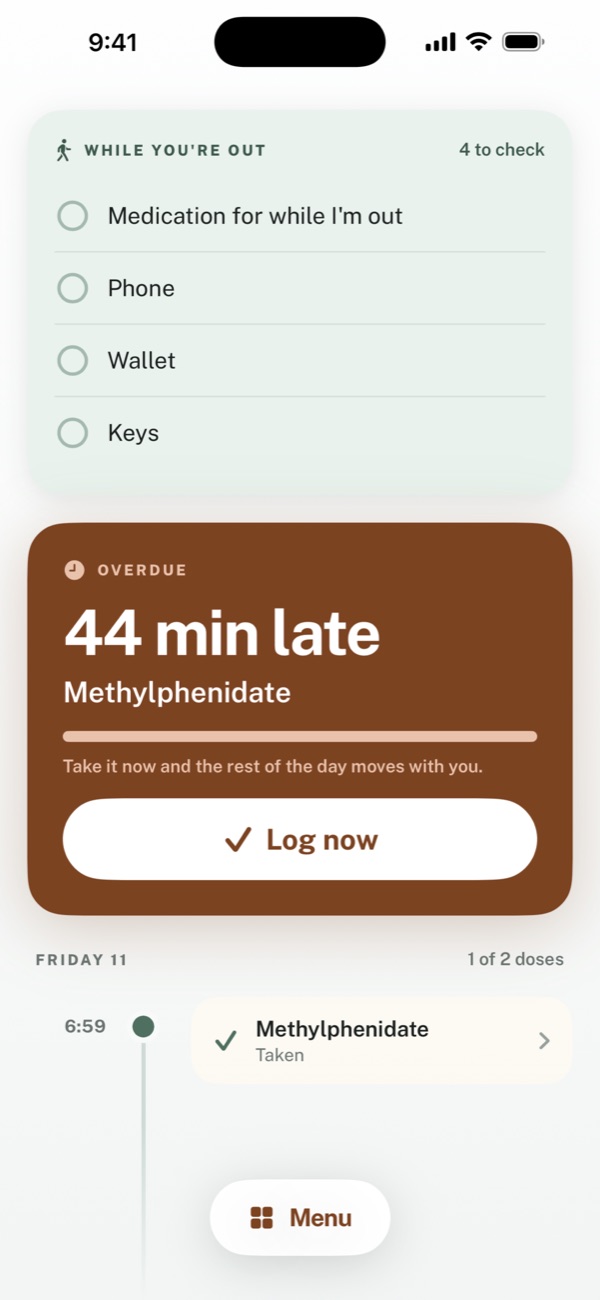
The one screen you need most days.
- Next up
- The largest thing on the screen is always the timing answer: how long until the next dose, or that one is due, or how late it is.
- Timeline
- Doses, routines and appointments on one rail whose gaps track real time, with what's done and what's still ahead.
- While you're out
- When you're away from home, the things you carry appear at the top of Today to tick off.
- Daily review
- In the evening, a prompt to go through the day's loose thoughts.
Reminders
Persistent enough to work, with ways to make them stop.
- Dose reminders
- A notification when a dose is due, with follow-ups if it goes unanswered. Mark it taken or snooze it from the notification.
- Lock Screen countdown
- A card appears on the Lock Screen ahead of each dose-chain dose. You choose how far ahead, from 5 to 60 minutes. Its button opens the log screen rather than logging by itself, so a dose can't be recorded by accident.
- Quiet hours
- A window overnight when dose reminders hold off.
- Alarm sounds
- A choice of sounds for time-sensitive alerts.
- Widgets
- Home Screen and Lock Screen widgets showing what's next. Choose what they include.
Your day
Anchor knows when your day starts and ends, and behaves differently outside it.
- Day start and end
- Set the times, or start and end the day yourself. Shortcuts actions let your phone's Sleep Focus or wake-up alarm do it.
- Morning brief
- The first time you open Anchor each day: today's routines and appointments, plus anything coming up that you marked as important. "In one week you have…"
- Read aloud
- The brief can read itself in a voice of your choosing, and stays quiet when the phone is on silent. Medication names are never spoken.
- Routines
- Things you do on set days at a set time, with follow-up reminders. Mark them done, or skip one with a reason.
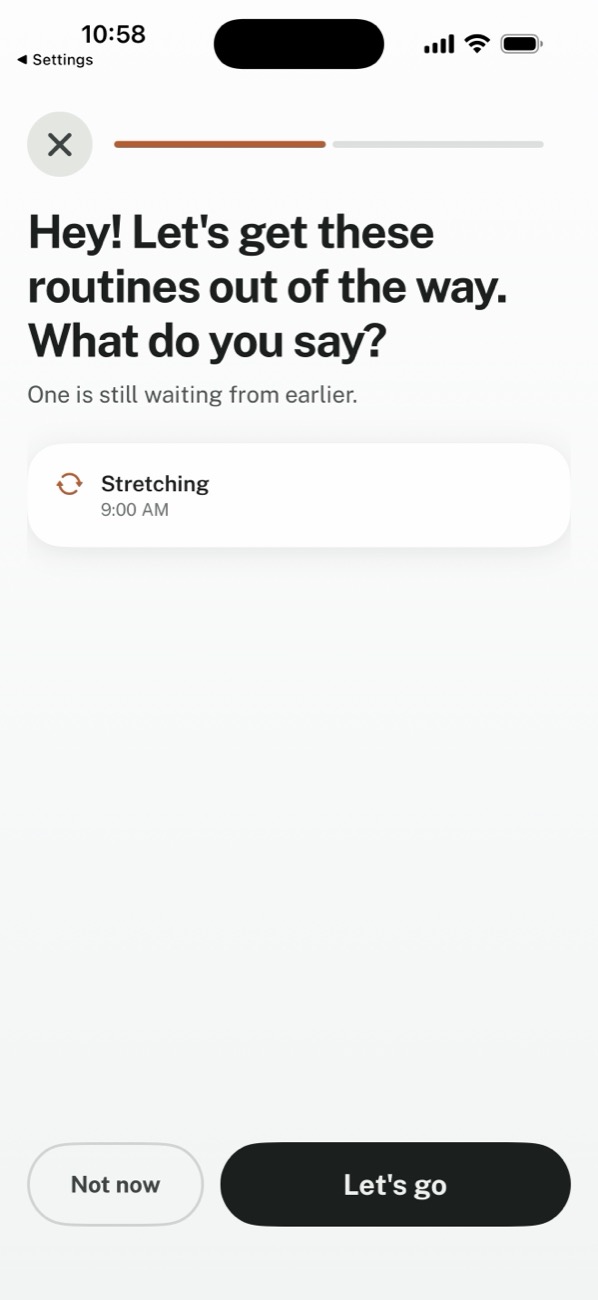
- Routine catch-up
- Open Anchor with a routine overdue and it asks about it first, one at a time: done, skip today, or later. If you opened the app to log a dose, it waits until you have.
Calendar and treatment plans
Appointments that come with their own reminders and preparation.
- Events
- Ten kinds of event, from a doctor's appointment to a flight. Events can repeat daily, weekly, monthly or yearly.
- Your own categories
- Make your own kinds of event with a name and one of 64 icons.
- Saved events
- Save any event, then add it again in one tap, on any day, at its usual time.
- Time to leave
- Give an event a place and Anchor works out the travel time with traffic, then reminds you when to start getting ready and when to leave. A Directions button opens Apple Maps, Google Maps or Waze.
- How much it matters
- Four levels decide how many reminders you get and how far ahead they start, from once on the morning to a week out.
- Preparation checklists
- Trips and appointments get a checklist to work through beforehand, with a reminder to do it.
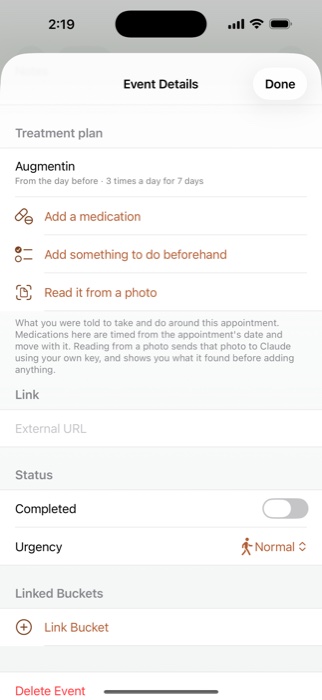
- Treatment plans
- Attach what you were told to take and do around an appointment. Courses start so many days before or after, amounts can step down daily, and one-off steps are timed back from the appointment. Move the appointment and the plan moves too.
- Read a plan from a photo
- Photograph the sheet and Anchor drafts the plan for you to check and correct. This uses the optional Ask Claude feature.
Leaving and arriving
Reminders tied to where you are, not what time it is.
- Home and other places
- Pin a place on the map and choose a checklist for arriving or leaving.
- Bluetooth beacons
- Optional iBeacon tags make it more precise. A place, a vehicle and something you carry each behave differently.
- Smarter departures
- You've left home when its beacon is quiet and either your car's beacon is with you or GPS agrees. Walking out of range inside the house does nothing.
- Things you carry
- Tag a medication pouch. Anchor stays silent at home, and tells you if you reach the car without it, leave without it, or lose it while you're out.
- Ways to quieten it
- Choose how long a change must hold before you hear about it. Each notification has "I'm good" and "Quiet for 1 hour".
Thoughts, journal and tracking
Places for what would otherwise be lost.
- Thoughts
- Short notes captured in a tap and sorted into buckets, including a To Dos bucket and a Daily Review.
- Medical Journal
- Longer entries, searchable, with tags and pinning.
- Tracking
- Questions Anchor asks on a schedule: after each dose, every morning or evening, or at a time you set.
- Checklists
- Reusable lists you can link to places and events.
Everything else
- Siri and Shortcuts
- Record a dose, ask when the next one is, add a thought or a checklist item, and start or end your day, by voice or from an automation.
- Ask Claude
- Optional. Add your own Anthropic API key to ask questions from inside the app. Off until you set it up.
- Backups
- Export everything to a file you keep, and restore from it.
- Private
- No account. Your data stays on your iPhone. Privacy policy.